How digital communication elevates your tournament

A well-organised tournament stands or falls with clear communication. Teams want to know where and when they play, supporters want to follow scores live, and volunteers need to know exactly what is expected of them. Digital communication makes all of this easier: it is fast, flexible and available to everyone at any time.
In this article you’ll discover how to present your tournament digitally and which tools you can use to do so. Clear, professional and – above all – practical.
1. Bring all information together in one central place
One of the biggest challenges in tournament organisation is scattered information: emails, posters, Excel sheets, WhatsApp messages, website updates… before you know it, nobody is sure where to find the latest version.
A smarter way is to choose one central digital hub where all up-to-date information lives, such as:
- Game schedules
- Results and standings
- Pitch layouts
- Practical info (parking, catering, house rules)
- Contact details for coaches
- Announcements or last-minute changes
Whether you create a simple web page, use a shared document or rely on dedicated tournament software: communicating centrally and consistently prevents questions, noise and misunderstandings.
Tip: create a QR code that links to this central hub and place it on posters, banners and at the entrance. This gives everyone instant access to the right overview.
2. Think in terms of audiences
Each audience at your tournament has different information needs. By deciding in advance who needs to know what, you avoid over-communicating to some and under-communicating to others.
Teams and coaches
- Match times
- Rules and agreements
- Changing room allocation
- Contact persons
Supporters
- Day programme
- Results and standings
- Side activities, food & drinks
Volunteers & officials
- Instructions and planning
- Shifts and responsibilities
- How to receive updates when things change
When you structure information and tailor it to each audience, people feel well prepared and the tournament day itself runs more smoothly.
3. Use real-time updates to keep everyone connected
Tournaments are dynamic by nature: matches run late, teams withdraw, pitches change. Digital communication allows you to share these changes instantly, with everyone, without extra manual work.
Whether you use a website, an app or a shared online dashboard, real-time updates ensure nobody is left with outdated information.
Tip: in Tournify’s tournament software you’ll find three key presentation options: a website, app and slideshow. Schedules, results, standings and sponsors are automatically visible to everyone. This makes it easier for participants and spectators to follow the tournament, without adding extra work for the organisation.
4. Make use of big screens on-site
A digital presentation on a big screen is a powerful communication tool for events. Think of TVs in the clubhouse, a projector in the entrance hall or LED screens near the pitches. These screens can show schedules, results, standings, upcoming matches, sponsor messages and practical announcements.
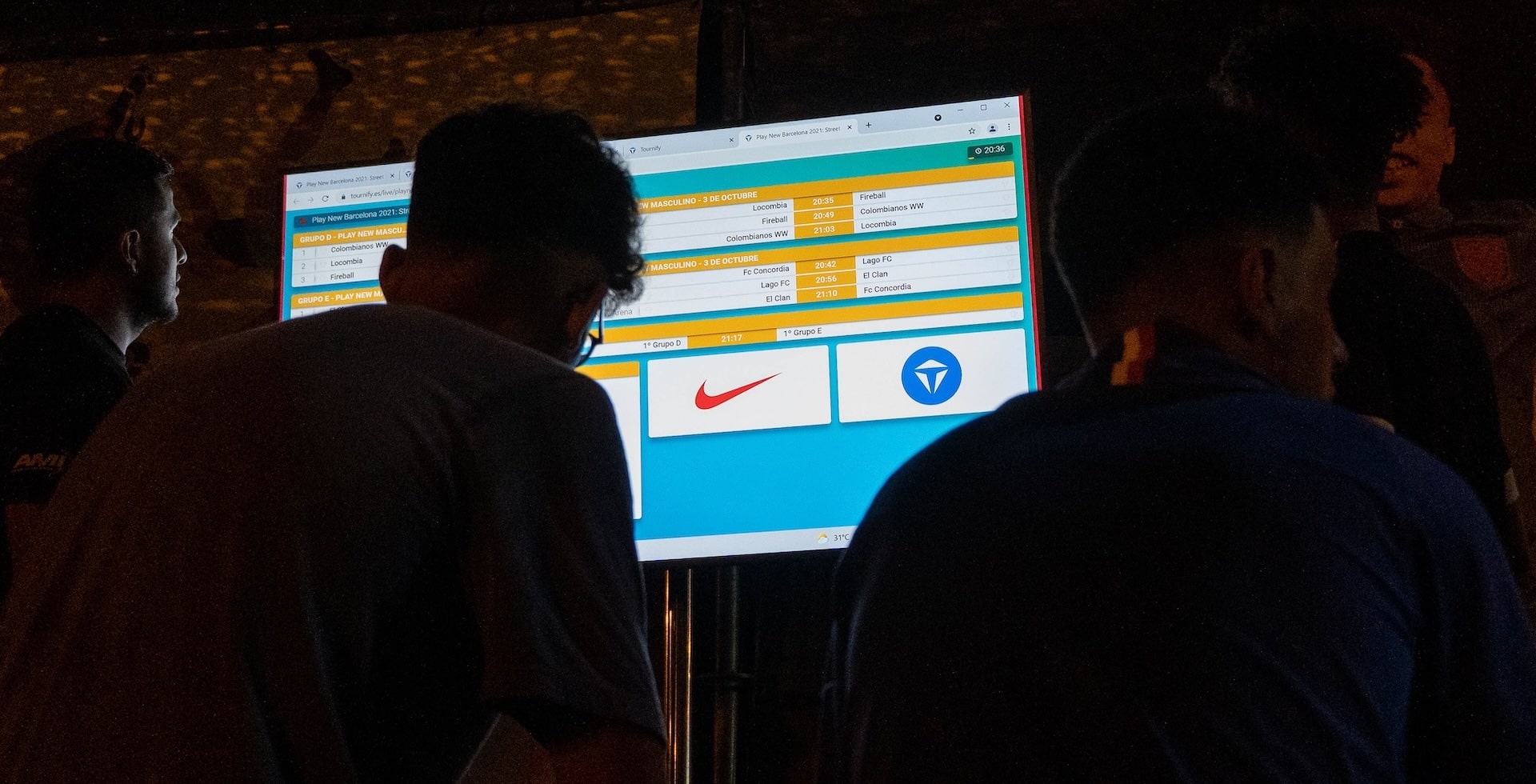
Key benefits:
- Visitors don’t need to constantly check their phones
- The venue feels calmer and more organised
- You can highlight last-minute changes immediately
You can create a slideshow with tools like PowerPoint or Google Slides, or use dedicated tournament software with a built-in presentation mode.
5. Make information easy to find and easy to share
Digital communication works best when players, parents and visitors can effortlessly share information with their own group or team.
Keep in mind:
- Short URLs → easy to remember and forward
- Mobile-friendly design → most visitors will use their phone
- Clear naming → choose logical titles like “Schedule”, “Standings”, “Map”
- Visual support → clear, visual overviews of rules and schedules are shared more often
Tip: create a simple “key info” image. Include things like match duration, point system, pitch numbers and the most important rules. Coaches can easily share this via WhatsApp to brief their teams.
6. Communicate not only before and during, but also after the tournament
Digital communication doesn’t stop with the final whistle. Good follow-up ensures participants leave with a positive impression – and are more likely to return. Consider:
- Sharing photos and videos
- Thanking teams and volunteers
- Announcing the next edition
- Sending out a feedback survey
- Publishing final standings, stats and highlights
Conclusion
Digital communication is an essential ingredient of a modern tournament. By presenting information centrally, accessibly and in real time, you create peace of mind for the organisers and clarity for participants. Your event feels more professional, more structured and more attractive.
Tools like Tournify help you bundle and present information in one place, but the underlying principles apply everywhere: make your information clear, central, real-time and easy to share.
Would you like to learn more about digital tournament presentation? In this short explainer video we walk you through the three ways to present your tournament live in a beautiful and simple way with Tournify.